Black Friday: bundles at -40% and codes BF27 / CYBER30 (-30%) until 30 Nov
FR
Content Calendar & Creator OS
● Notion templates

Content Calendar & Creator OS

Notion Template for Content Creators

€19Notion template (duplication link)

Secure payment by Payhip: card or PayPal

  • Download after payment
  • No parcel
  • Payment on the platform you choose
Format
Notion template (duplication link)
Language
English
Age
Adults
Delivery
Digital file
Shelf
Notion templates
This resource also exists in French

Description

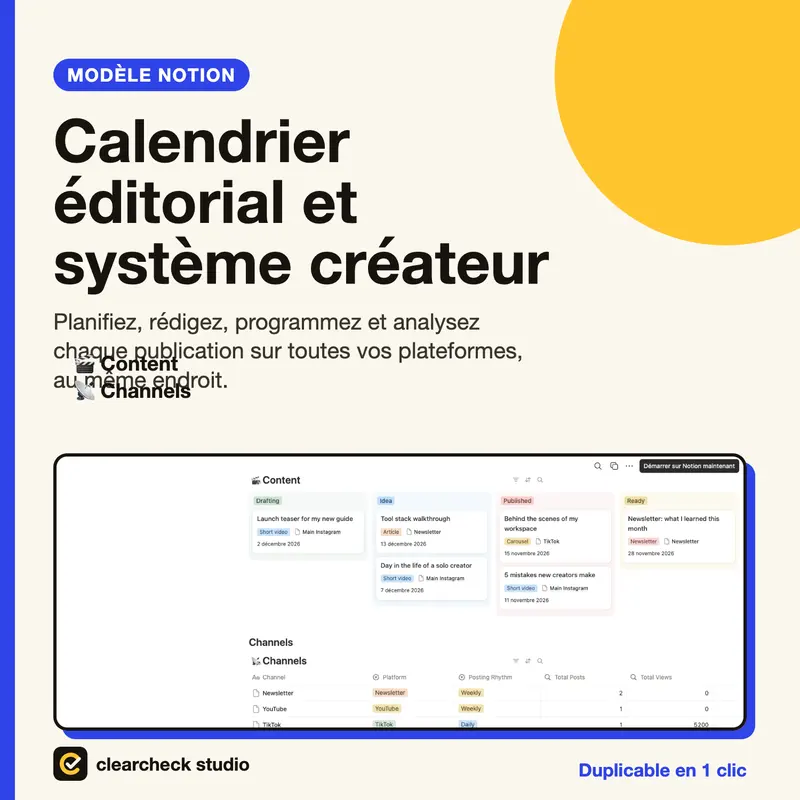
Plan, write, schedule and review every post across all your platforms in one place.

Content Calendar & Creator OS is a ready-made Notion workspace with 2 connected databases (Content, Channels), a Home page with a 10-minute start guide, ready-made views and realistic sample data you can delete in one click.

Who it’s for

What’s included

  • Add your platforms in the Channels table (handle, goal, posting rhythm).
  • Capture ideas in the Content table with Status = Idea.
  • Pick a publish date and move cards across the board from Idea to Published.
  • After publishing, fill Views and Likes so the Performance view shows what works.
  • Formulas and rollups already built: Engagement % = Likes divided by Views.
  • Delivery PDF with your duplication link and support contact
  • Instant delivery, no subscription, lifetime access to your copy
  • Independent template, not affiliated with or endorsed by Notion. It is an organising tool and does not replace professional advice.
  • Questions? Write to the support email in your delivery PDF: reply within 2 business days.

How to use it

How to use:

After purchase you receive a PDF with a link. Open it, click Duplicate, and the workspace is copied into your own Notion account. Works on a free Notion plan.

Look before you buy

Page previews

Frequently asked questions

What exactly do I get?

A digital file (notion template (duplication link)). Nothing physical is shipped.

How do I open and use the file?

After purchase you receive a PDF with a link: open it, click Duplicate, and the workspace is copied into your own Notion account (the free plan is enough).

Can I print it more than once?

Yes, for your own personal and family use. Reselling, sharing the file and commercial reproduction are not allowed.

Where does the payment happen?

On Payhip, which takes the payment and delivers the file. This shop never receives or stores your payment details.

Is there a French version?

Yes: the French version has its own page.

Notion templates

More from this shelf

€19Buy on Payhip